Integrate RKTracer with Keil once using rktracer -keil -integrate, switch RKTracer ON from the Tools menu, then clean, rebuild and run your tests. Save the on-target coverage with RKTracer Dump to write out the RK_MEM data, then run RKTracer Report to generate the HTML report.
RKTracer is a code coverage tool for Keil uVision and Keil MDK-ARM. It measures function, statement, decision, condition, MC/DC and multi-condition coverage for C and C++, on the uVision simulator or on the real Arm Cortex-M target connected to your host. Instrumentation happens at compile time, so you never edit your source files and you never touch your build settings beyond switching RKTracer on.
The flow is short: integrate RKTracer with Keil uVision once, switch it on from the Tools menu, clean and rebuild, run your tests, save the coverage data, and generate an HTML report. The sections below reproduce every step and every command, including the Keil Arm toolchain executables that get instrumented, the RKTracer Dump that saves data from the RK_MEM buffer, selecting which files to instrument, and the scriptable command-line mode for CI. For the wider picture see the RKTracer overview, the full list of coverage metrics, and the embedded targets guide. Browse all toolchains in the documentation.
Step 1: Integrate RKTracer with Keil uVision
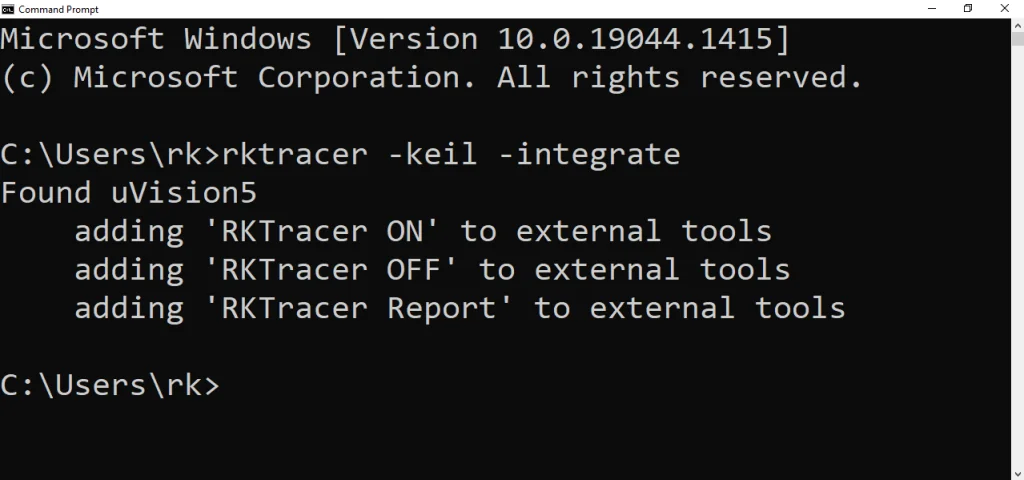
Integrating RKTracer adds the RKTracer ON, RKTracer OFF and RKTracer Report entries to the Keil uVision Tools menu (the External Tools list). You run this once per machine. Make sure the Keil uVision IDE is closed first.
- Open Command Prompt. Press
Win + R, typecmd, and pressEnterto open the Command Prompt. - Execute the integration command. In the Command Prompt, run the command below to integrate RKTracer with the Keil uVision IDE.
> rktracer -keil -integrate
RKTracer detects your uVision installation and registers the three External Tools entries. The output looks like this:
Found uVision5
    adding 'RKTracer ON' to external tools
    adding 'RKTracer OFF' to external tools
    adding 'RKTracer Report' to external tools
After opening Keil uVision following the integration, the Tools menu displays three new options:
- RKTracer ON switches the RKTracer instrumentation on.
- RKTracer OFF switches the RKTracer instrumentation off.
- RKTracer Report generates the code coverage reports in HTML format.
Step 2: Switch on the RKTracer tool in Keil
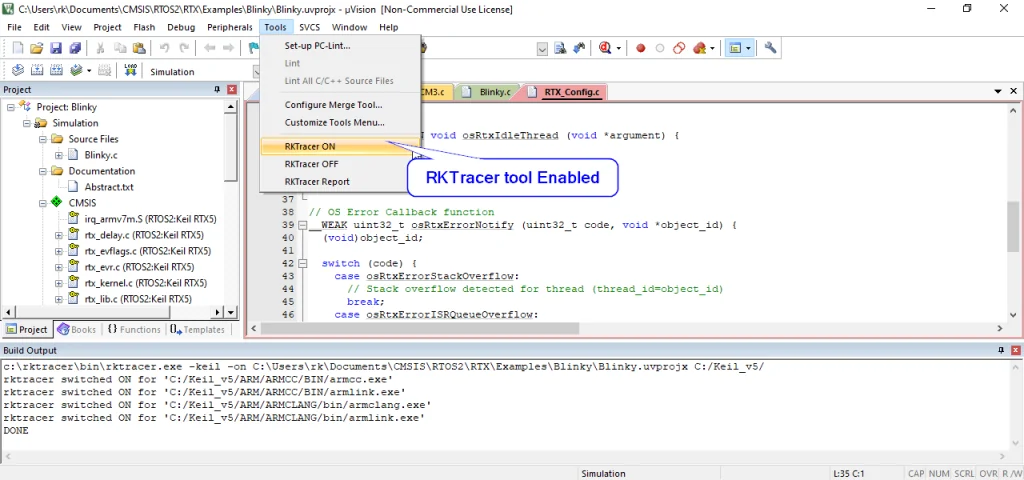
In Keil uVision go to the Tools menu and choose RKTracer ON. When you switch the tool on for the first time, you might get a popup to grant read and write permission for the Keil uVision IDE; this is a one-time job. The Build Output window then shows RKTracer switching the Keil Arm toolchain executables on for instrumentation:
c:\rktracer\bin\rktracer.exe -keil -on C:\Users\rk\Documents\CMSIS\RTOS2\RTX\Examples\Blinky\Blinky.uvprojx C:/Keil_v5/
rktracer switched ON for 'C:/Keil_v5/ARM/ARMCC/BIN/armcc.exe'
rktracer switched ON for 'C:/Keil_v5/ARM/ARMCC/BIN/armcc.exe'
rktracer switched ON for 'C:/Keil_v5/ARM/ARMCLANG/bin/armclang.exe'
rktracer switched ON for 'C:/Keil_v5/ARM/ARMCLANG/bin/armlink.exe'
DONE
RKTracer switches the Keil Arm toolchain executables on for instrumentation, covering both Arm Compiler 5 (armcc) and Arm Compiler 6 (armclang), plus the Arm linker (armlink). Use RKTracer OFF from the same Tools menu to switch instrumentation off again.
Step 3: Rebuild the application and run your tests
With RKTracer switched on, clean and rebuild the project so instrumentation is applied at compile time. Every time you change source code you must rebuild, because instrumentation happens at the source level during compilation.
- Clean and rebuild. Rebuild all target files in Keil uVision so the instrumented Arm Compiler 5 or Arm Compiler 6 toolchain rewrites your objects with coverage probes.
- Run your tests. Run the application in the uVision simulator or on the connected Arm Cortex-M target in debug mode, exercising your test cases.
Generate an empty report once before you run your tests to confirm every file and folder you expect is instrumented without build errors. You can do this from Tools · RKTracer Report or from the command line with rkresults.
Step 4: Save the code coverage data with RKTracer Dump
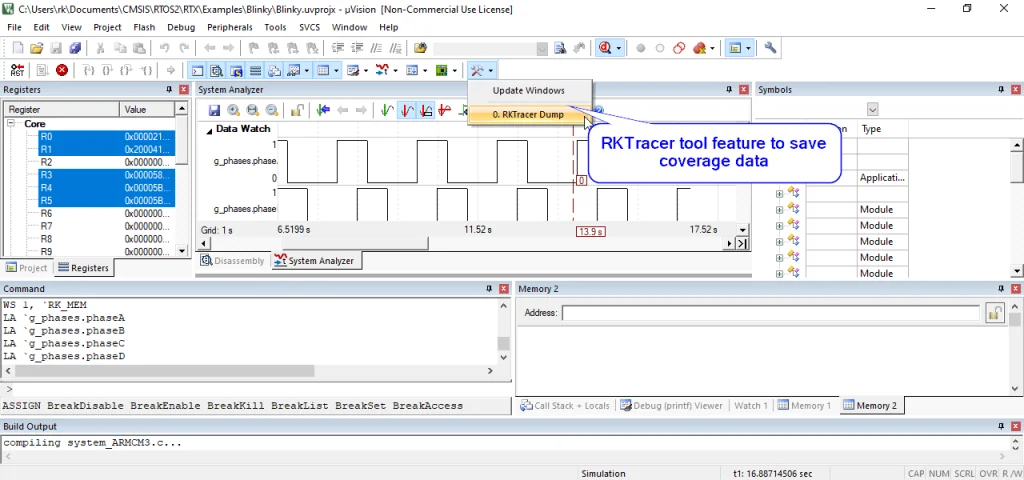
In debug mode, RKTracer Dump saves the runtime coverage data from the RK_MEM buffer. It appears under the uVision System Analyzer · Update Windows menu as RKTracer Dump. The uVision command window runs commands like the one below to write out the RK_MEM coverage region:
WS 1, `RK_MEM
RKTracer automatically saves the coverage data when you stop debugging, or you can trigger RKTracer Dump manually at any point during the debug session. For scenarios without a target device connection, you can save the coverage data from the RKTracer variable to the host machine.
Step 5: Generate the code coverage reports with RKTracer Report
In Keil uVision go to the Tools menu and choose RKTracer Report. The Build Output window shows the report pipeline running:
c:\rktracer\bin\node.exe c:\rktracer\bin\rkresults
rkupdate reading coverage data file: rk-coverage.txt
rkupdate done: 20 files in 524ms
rkreport reading input files: 20 .json files
rkreport done: Done with creating 20 file level html reports in 2463ms
Point your browser to file:///C:/Users/rk/Documents/CMSIS/RTOS2/RTX/Examples/Blinky/rktracer/report/index.html
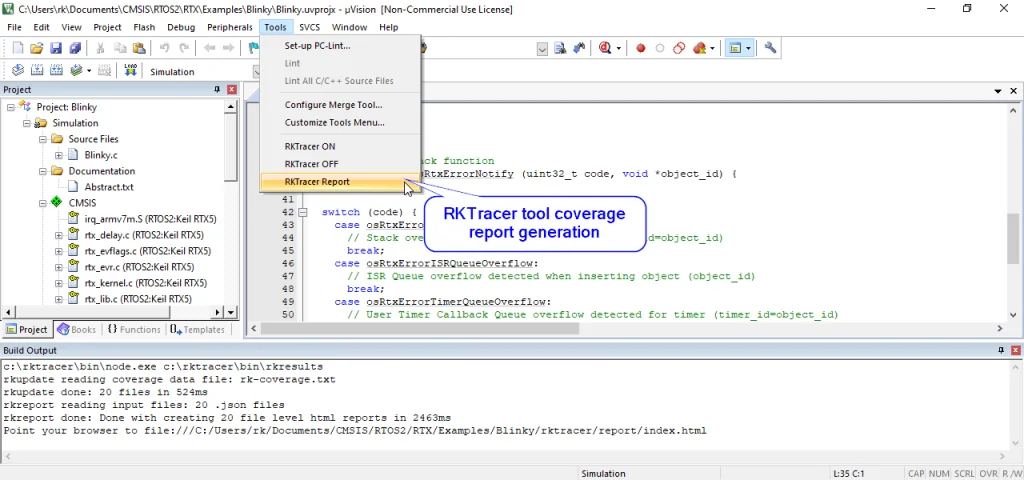
RKTracer Report runs rkresults, reads rk-coverage.txt, maps it with the instrumentation JSON files generated during the build, and generates color-coded HTML reports, then opens report/index.html. You can also run rkresults from the command line in your project folder:
> rkresults
The report opens at rktracer/report/index.html in your project folder. Each instrumented source file gets its own page with color-coded statement, decision, condition and MC/DC coverage.
Enable coverage for selected files
You can scope coverage to specific folders, files or functions by editing rktracer.config in the RKTracer installation folder (C:\rktracer). This is especially useful on limited-memory Arm Cortex-M targets, where you only want to instrument a chosen subset of the application.
ignore *.c
instrument */power/* */core/* */keys/*
never */firmware_loader/* */lockdown/*
ignore *.cignores all C source files from instrumentation.instrumentinstruments source files from the given folders.neverpermanently skips the selected folders.
To generate coverage only for specific functions, edit rktracer.config with the function selectors:
function-ignore *
function-instrument fun_X() fun_Y() fun_Z()
function-ignore *ignores all functions.function-instrument fun_X() fun_Y() fun_Z()instruments only these three functions.
After editing rktracer.config, clean and rebuild the project so the new instrumentation scope is applied. The config file only takes effect at compile time.
Command-line and CI mode for Keil
The Tools menu actions are thin wrappers around the same command-line switches, so the whole RKTracer flow can run headless inside continuous integration. The RKTracer ON and RKTracer OFF entries call rktracer -keil -on and rktracer -keil -off against your project, which you can script directly.
Point RKTracer at your .uvprojx project and your Keil installation folder to switch instrumentation on:
> rktracer -keil -on "path_to_project\Blinky.uvprojx" "C:/Keil_v5/"
RKTracer switches on the Keil Arm toolchain executables (armcc, armclang and armlink) exactly as the Tools · RKTracer ON menu entry does.
Build the instrumented project with the uVision command-line build (UV4.exe), then run your tests on the simulator or target.
> "C:/Keil_v5/UV4/UV4.exe" -r "path_to_project\Blinky.uvprojx" -j0
After the tests run, save the RK_MEM coverage data to your project folder, just as RKTracer Dump does in the IDE. RKTracer converts it to rk-coverage.txt for the report step.
Navigate to your project folder and run rkresults. Ensure the rktracer folder and the saved coverage data are present.
> cd path_to_project_folder
> rkresults
When you are done, switch instrumentation off again so the next non-coverage build is clean:
> rktracer -keil -off "path_to_project\Blinky.uvprojx" "C:/Keil_v5/"
Because every step is a single command, you can drop this sequence into Jenkins, Azure DevOps or GitLab CI to produce a fresh HTML coverage report on every build. Building coverage on another toolchain too? See the companion guides for IAR Embedded Workbench and Code Composer Studio.
Frequently asked questions
How do I measure code coverage in Keil uVision?
Integrate RKTracer once with rktracer -keil -integrate, then switch it on from Tools · RKTracer ON, clean and rebuild your project, run your tests on the uVision simulator or the real Arm Cortex-M target, and generate the report from Tools · RKTracer Report or with the rkresults command. Instrumentation happens at compile time, so there are no source changes.
Does RKTracer support MC/DC coverage in Keil MDK-ARM?
Yes. RKTracer measures statement, decision, condition, MC/DC and multi-condition coverage for C and C++ built with Keil MDK-ARM. MC/DC is the strongest structural coverage metric, and RKTracer measures it natively alongside the others on the Arm Cortex-M target.
Which Keil compilers does RKTracer instrument?
RKTracer instruments the full Keil Arm toolchain. When you switch it on it covers Arm Compiler 5 (armcc) and Arm Compiler 6 (armclang), plus the Arm linker (armlink), so both legacy and modern Keil MDK-ARM projects are supported.
How do I save coverage data from the Keil debugger?
In debug mode RKTracer Dump writes the runtime coverage from the RK_MEM buffer. It appears under the uVision System Analyzer · Update Windows menu as RKTracer Dump and runs a command like WS 1, `RK_MEM to write out the region. RKTracer saves the data automatically when you stop debugging, or you can trigger RKTracer Dump manually.
How do I generate the HTML code coverage report in Keil uVision?
Go to the Tools menu and choose RKTracer Report. It runs rkresults, reads rk-coverage.txt, maps it with the instrumentation JSON files and writes color-coded HTML reports, then opens rktracer/report/index.html in your browser. You can also run rkresults from the command line.
Can I run RKTracer for Keil from the command line or CI?
Yes. The Tools menu actions are wrappers around rktracer -keil -on and rktracer -keil -off, which you can script. Build your project headless with UV4.exe, save the RK_MEM data, then run rkresults to generate the report, so the whole flow runs inside Jenkins, Azure DevOps or GitLab CI.
Do I need to change my source code to add coverage in Keil?
No. RKTracer instruments at the source level during compilation and adds its runtime automatically. You never edit your source files; you only switch RKTracer ON, then clean and rebuild.
How do I measure coverage for only selected files in Keil?
Edit rktracer.config in the RKTracer installation folder. Use ignore, instrument and never selectors to scope coverage to chosen folders or files, and function-ignore with function-instrument to scope it to specific functions. This is useful for limited-memory Arm Cortex-M targets.